Time Shift Time Controls
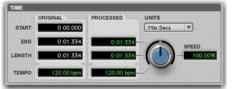
The Time section of Time Shift provides controls for specifying the amount of time compression or expansion as well as the timebase used for calculating TCE. Adjust the Time control to change the target duration for the processed audio.
Time Shift, Time section
• Original
Displays the Start and End times, and Length of the edit selection. Times are displayed in units of the timebase selected in the Units pop-up menu.
• Processed
Displays the target End time and Length of the processed signal. Times are displayed in units of the timebase selected in the Units pop-up menu. You can click the Processed End and Length fields and type values. These values update automatically when adjusting the Time control.
• Tempo
Displays the Original Tempo and Processed Tempo in beats per minute (bpm). You can click the Original Tempo and Processed Tempo fields and type values. The Processed Tempo value updates automatically when adjusting the Time control.
• Unit
Select a timebase for the Original and Processed time fields: Bars|Beats, Min:Sec, Timecode, Feet+Frames, or Samples.
• Speed
Displays the target time compression or expansion as a percentage of the original. Adjust the Time control or click the Speed field and type a value. Time can be changed from 25.00% to 400.00% of the original speed (or 4 to 1/4 times the original duration). The default setting is 100.00%, or no change. 25.00% results in 4 times the original duration and 400.00% results in 1/4 of the original duration.
The Speed field only displays up to 2 decimal places, but lets you type in as many decimal places as you want (up to the IEEE standard). While the display rounds to 2 decimal places, the actual time shift is applied based on the number you typed.