Telescoping Warp
Telescoping Warp can be applied to any audio clip before or after a Warp marker as long as no other Warp marker precedes or follows it accordingly. The audio can be on a sample- or tick-based track. Telescoping Warp is especially useful for adjusting audio files to match the project tempo map and Bar|Beat grid.
To apply Telescoping Warp to a clip:
1. Make sure you are in Warp view,
2. Do one of the following:

With the Grabber tool, drag any Event marker that is after the last Warp marker in the clip to the left or right to Telescope-Warp the audio that is after the Warp marker in or out. If no Warp marker is present in the clip, one is created automatically at the clip start. The clip start remains anchored to its location on the Timeline.
With the Grabber tool, Option-drag (Mac) or Alt-drag (Windows) any Event marker that is before the first Warp marker in the clip to the left or right to Telescope-Warp the audio that is before the Warp marker in or out. If no Warp marker is present in the clip, one is created automatically at the clip end. The clip end remains anchored to its location on the Timeline.
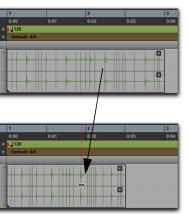
Before and after warping, applying Telescoping Warp with the clip start fixed