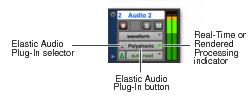
Elastic Audio Track Controls
Audio tracks provide controls for enabling Elastic Audio, selecting the Elastic Audio plug-in, and selecting whether Real-Time or Rendered Elastic Audio processing.
Elastic Audio Track controls
• Elastic Audio Plug-In Selector
Selects the Elastic Audio plug-in for Elastic Audio processing (see
“Elastic Audio Plug-Ins” on page 562). You can also use the Elastic Audio Plug-In selector to disable Elastic Audio processing, and to select either Real-Time or Rendered processing (see
“Real-Time and Rendered Elastic Audio Processing” on page 560).
• Elastic Audio Plug-In Button
Displays the name of the selected Elastic Audio plug-in. Click the Elastic Audio Plug-In button to open the Elastic Audio Plug-In window (see
“Elastic Audio Plug-Ins” on page 562).
• Real-Time or Rendered Processing Indicator
Lights when Elastic Audio processing is real-time and dims when Elastic Audio processing is rendered (see
“Real-Time and Rendered Elastic Audio Processing” on page 560).