AudioSuite Plug-In Preset Controls
Most AudioSuite plug-ins let you load and save presets (plug-in settings files). However, some AudioSuite plug-ins, such as DC Offset Removal or Duplicate, do not provide Preset controls.
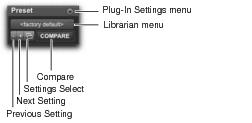
AudioSuite Preset controls
• Plug-In Selector
Lets you select any AudioSuite plug-in installed on your system.
• Plug-In Settings Menu
Lets you copy, paste, save, and import plug-in presets.
• Plug-In Librarian Menu
Recalls settings files (presets) saved in the plug-in’s root settings folder.
• Next (+) and Previous (–) Setting Buttons
Lets you select the next or previous plug-in setting from the Plug-In Librarian menu.

You will lose the current plug-in settings if they are not saved before you use the Next and Previous Setting buttons. Always save your plug-ins settings as presets using the Plug-In Settings menu.
• Plug-Ins Settings Select Button
Accesses the Plug-In Settings dialog, which lists the presets for the current plug-in. From this list, you can select a new preset, or audition a series of presets.
• Compare
Toggles between the original saved plug-in preset and any changes you have made to it so you can compare them.
 For more information about plug-in presets, see “Plug-In Presets” on page 646.