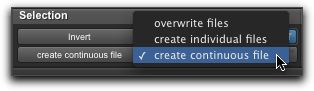
File Mode Selector
This menu lets you select whether or not the AudioSuite plug-in will process the selected audio destructively or nondestructively, and how the original files will be modified.
File Mode pop-up menu (Invert plug-in shown)
There are three File mode options:
• Overwrite Files
Processes the selected clips destructively, overwriting the original audio. Not all AudioSuite plug-ins can be used destructively.
• Create Individual Files
Processes the selected clips nondestructively, creating a new audio file for each clip. The new audio files are added to the project, leaving the original source audio files in the Clips List unchanged. (Whether the processed audio is added to the track or only to the Clips List, is determined by the Selection Reference setting.)
• Create Continuous File
Processes the selected clips nondestructively and creates a new audio file consisting of the selected clips consolidated into a single, unbroken clip. This mode is particularly useful if you are assembling a composite track from multiple takes. This mode is not available when the Selection Reference is set to Clips List.

The Create Continuous File option is not available with some time domain plug-ins. To achieve a similar result, use the Duplicate plug-in to consolidate clips processed with these plug-ins.