Selection Reference
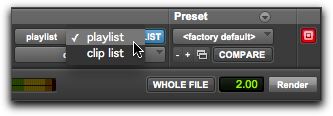
This menu aims the selected process at either clips selected in an audio track or at clips selected in the Clips List.
When you select a clip on-screen (in either a track or the Clips List) Pro Tools | First selects both occurrences of the clip. Since you may not want to process both, this menu provides a convenient means of limiting the AudioSuite process to clips selected in one or the other.
Selection Reference pop-up menu (Invert plug-in shown)
• Playlist
Applies AudioSuite processing to clips on tracks. Processed clips also appear in the Clips List.
• Clips List
Applies AudioSuite processing only to selected clips in the Clips List. Processing is not be applied to clips on tracks.

If the Use In Playlist option is enabled in addition to Clips List being selected in the Selection Reference pop-up menu, the processing will be applied to the selected clip in both the track and the Clips List.