Real-Time Properties on Tracks and Clips
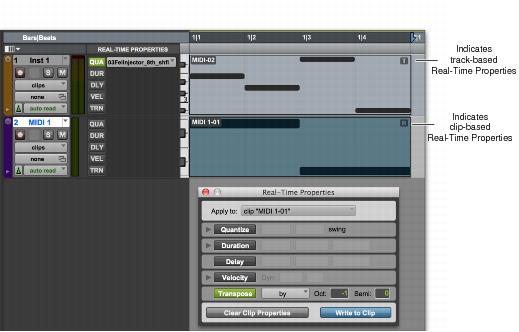
Real-Time Properties can be configured to apply to an entire track (all clips on that track), or on a clip-by-clip basis. Track-level properties also provide real-time MIDI input processing of velocity and transposition.
The presence of track-based Real-Time Properties are indicated by a “T” displayed in the upper right-hand corner of MIDI clips. Clip-based Real-Time Properties are indicated by an “R” displayed in the upper right-hand corner of the clip. Clips boundaries including the “T” and the “R” displays are indicated in Notes view and in MIDI Editor windows, but not in the Score Editor window.
Track-based and clip-based Real-Time Property indicators