Deleting MIDI Notes
In addition to deleting selected notes with the Clear command in the Edit menu, individual notes can also be deleted with the Pencil tool.
To delete a group of MIDI notes with the Clear command:
2. Do one of the following:

Choose
Edit > Clear to delete the selected notes. The track’s underlying controller data remains intact.
With any Edit tool, Right-click any selected note and choose
Clear.
Press the Delete (Mac) or Backspace (Windows) key.

When deleting MIDI notes within a time range selection, all underlying controller and automation data is also deleted.
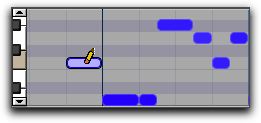
To delete a single MIDI note with the Pencil tool:
With the Pencil tool selected, Option-click (Mac) or Alt-click (Windows) the note. The Pencil tool changes to an Eraser when Option (Mac) or Alt (Windows) is pressed.
Deleting a note with Pencil tool

Program change events and Sysex events can also be deleted by Option-clicking (Mac) or Alt-clicking (Windows) them with the Pencil tool.