Typing in Note Attributes
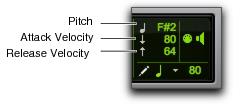
When an individual note is selected with the Pencil tool or any Grabber tool, its attributes are displayed in the Event Edit area.
Event Edit Area showing MIDI track information
Pitch is listed by note name and octave number. Attack and release velocities are listed with their MIDI values (0–127). Edit Selection Start, End, and Length times are displayed in the Main Time Scale.
To change an attribute for a MIDI note:
1. In the Edit window, with a MIDI or Instrument track set to Notes View, select the note with the Pencil tool or any Grabber tool.
2. Click in the Attributes text box and do one of the following:

Enter the new value on the numeric keypad.
Press the Up or Down Arrow to increment or decrement to the new value.
Drag up or down to scroll to the new value.
Play the new note value on your MIDI keyboard controller.
Press Forward Slash (/) to move between the fields in the Event Edit area.

You can also change attributes of MIDI notes in the MIDI Event List (see “MIDI Event List” on page 462).