Separate and Consolidate Tools for MIDI Notes
In Notes view in the Edit window and in MIDI Editor windows, both the Pencil and Grabber tools can be used to separate MIDI notes and to consolidate MIDI notes.
The cursor updates to show a “knife” for the Separate tool and a “bandage” for the Consolidate tool.
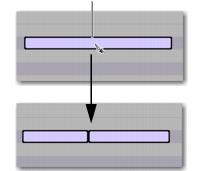
To separate a MIDI note with the Separation tool:

With the Grabber or Pencil tool, Control-Shift-click (Mac) or Start-Shift-click (Windows) on the MIDI note at the location where you want the separation.
MIDI note separated into two using the Separate Tool
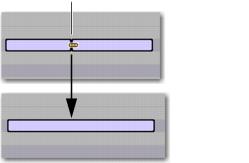
To consolidate MIDI notes with the Consolidate tool:
With the Grabber or Pencil tool, Control-Shift-click (Mac) or Start-Shift-click (Windows) between the separated MIDI notes.
Consolidating MIDI notes into one using the Consolidate Tool