Using the Pencil Tool
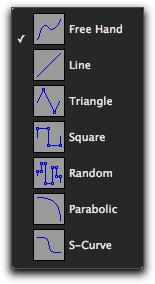
The Pencil tool is useful for creating and editing MIDI data. The first five Pencil tool shapes (Free Hand, Line, Triangle, Square, and Random) can be used to create MIDI notes with varying durations and velocities. In the Edit window and the MIDI Editor note velocities are determined by the Pencil tool shape. The various Pencil tool shapes can be particularly useful for drawing and editing different types of MIDI control data—for example, try using Line for volume, Triangle for pan, Free Hand for pitch bend, and Square or Random for velocity.
To select the Pencil tool shape:
1. Click the Pencil tool icon in the Toolbar for the Pencil tool shape pop-up menu.
2. Select a Pencil tool shape.
Pencil tool shapes available for MIDI
 Parabolic and S-Curve Pencil shapes are used for drawing tempo events only in the Tempo Editor. See “Drawing Tempo Events” on page 449.