Default Note Duration
The Default Note Duration setting lets you define the default note duration for inserting notes manually.
To select a Default Note Duration:
1. Click the Default Note Duration setting in the Edit window or the MIDI Editor window.
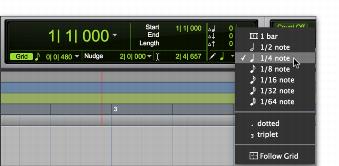
2. Select the Default Note Duration value you want. (For example, select the 1/4 Note option to insert quarter notes with the Pencil tool.)
Selecting a Default Note Duration in the Edit window
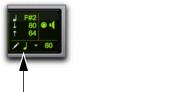
The Default Note Duration setting updates to show the selected note value.
Default Note Duration, quarter note selected
3. To define a dotted or triplet duration, do one of the following:

To dot the selected Default Note Duration value, click the Default Note Duration setting and select
Dotted.
To make the selected Default Note Duration value a triplet, click the Default Note Duration setting and select
Triplet.