Using EQ III in Band-Pass Mode
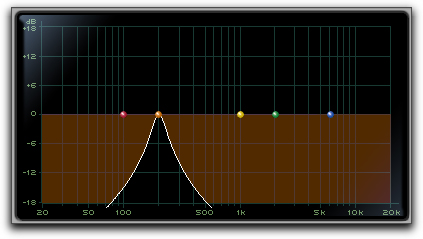
You can temporarily set any EQ III control to Band-Pass monitoring mode. Band-Pass mode cuts monitoring frequencies above and below the Frequency setting, leaving a narrow band of mid-range frequencies. It is especially useful for adjusting limited bandwidth in order to solo and fine-tune each individual filter before reverting the control to notch filter or peaking filter type operations.

Band-Pass mode does not affect EQ III Gain controls.
To switch an EQ III control to Band-Pass mode:

Hold Control+Shift (Mac) or Start+Shift (Windows), and drag any rotary control or control point horizontally or vertically.
EQ III interactive graph displaying Band-Pass mode
When monitoring in Band-Pass mode, the Frequency and Q controls function differently.
- Frequency
Sets the frequency above and below which other frequencies are cut off, leaving a narrow band of mid-range frequencies.
- Q
Sets the width of the narrow band of mid-range frequencies centered around the Frequency setting.
To switch an EQ III control out of Band-Pass mode:
Release Control+Shift (Mac) or Start+Shift (Windows).