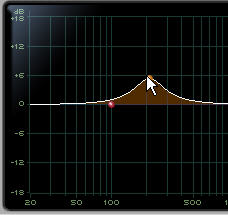
Dragging in the Frequency Graph Display
You can adjust the following by dragging the control points directly in the Frequency Graph display:
• Frequency
Dragging a control point to the right increases the Frequency setting. Dragging a control point to the left decreases the Frequency setting.
• Gain
Dragging a control point up increases the Gain setting. Dragging a control point down decreases the Gain setting.
• Q
Control-dragging (Mac) or Start-dragging (Windows) a control point up decreases the Q setting. Control-dragging (Mac) or Start-dragging (Windows) a control point down increases the Q setting.
Dragging a control point in the Frequency Graph display