Using Dynamics III Key Input for Side-Chain Processing
To use a filtered or unfiltered external key input to trigger dynamics processing:
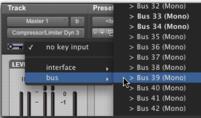
1. Click the Key Input selector and select the input or bus carrying the audio from the reference track or external audio source.
Selecting a Key Input
2. Click External Key to activate external side-chain processing.
External Key
3. To listen to the signal that will be used to control side-chain input, click Side-Chain Listen to enable it (highlighted).
Side-Chain Listen
4. To filter the key input so that only specific frequencies trigger the plug-in, use the HF and LF controls to select a frequency range.
5. Begin playback. The plug-in uses the input or bus that you chose as an external key input to trigger its effect.
6. Adjust the plug-in’s Threshold (Thresh) control to fine-tune external key input triggering.