Click II : Creating a Click Track (Manually)
Creating a Click Track (Manually)
To manually create a click track with the Click plug-in:
1. Select Options > Click to enable the Click option (or enable the Metronome button in the Transport).
2. Create new a mono Auxiliary Input track and insert the Click II plug-in.
3. Select a click sound preset.
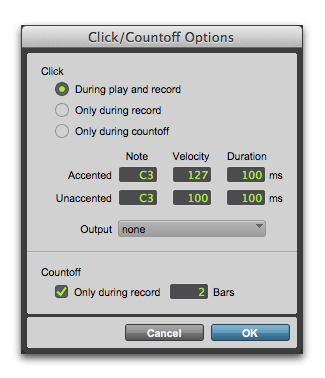
4. Choose Setup > Click/Countoff and set the Click and Countoff options.

The Note, Velocity, Duration, and Output options in this dialog are for use with MIDI instrument-based clicks and do not affect the Click II plug-in.
Click Options dialog
5. Begin playback. A click is generated according to the tempo and meter of the current session and the settings in the Click/Countoff Options dialog.