Auto-Naming for Strip Silence
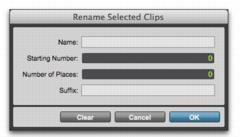
The Rename button in the Strip Silence window opens the Rename Selected Clips dialog, which determines how clips are named when stripping silence. The dialog remembers your previous settings, which can be cleared by clicking the Clear button.
Rename Selected Clips dialog
• Name
Specifies the base name for clips created with Strip Silence.
• Number
Specifies the number at which sequential auto-numbering starts.
• Zeros
Specifies the number of zeros that occur before the appended auto numbers.
• Suffix
Specifies text appended to the end of the name, after the auto numbering.
For example, if you set these naming options to:
• Name = SFX
• Auto Number Start = 23
• Leading Zeros = 1
• Suffix = .Reel1
The names generated for clips created by Strip Silence would be:
• SFX023.Reel1
• SFX024.Reel1
• SFX025.Reel1
• SFX026.Reel1