Editing Bar|Beat Markers
A Bar|Beat Marker can be edited to redefine its bar and beat location, which also redefines the start or end point of the range being analyzed for tempo. This is different from dragging a Bar|Beat Marker.
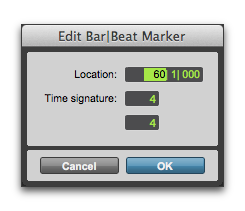
Edit Bar|Beat dialog
To edit a Bar|Beat Marker:
1. In the Tempo ruler, double-click the Bar|Beat Marker.
2. In the Edit Bar|Beat dialog, enter a new Location for the Bar|Beat Marker.
3. Enter a new Time Signature.
4. Click OK.
To delete a Bar|Beat Marker:

With the Grabber tool, Option-click (Mac) or Alt-click (Windows) the Bar|Beat Marker.