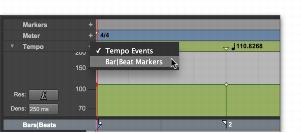
Choosing Bar|Beat Markers or Tempo Events
Because tempo events are tick-based, and Bar|Beat Markers are sample-based, they cannot be mixed. If a project contains tempo events and you attempt to insert Bar|Beat Markers, existing tempo events are converted to Bar|Beat Markers (and vice versa).
Tempo events can also be manually converted to Bar|Beat Markers and vice versa. When converting between Tempo events and Bar|Beat Markers, some amount of sample rounding may occur.
To use either tempo events or Bar|Beat Markers:
1. Press Command (Mac) or Control (Windows) and click the Add Tempo Change button.
2. Select either Tempo Events or Bar|Beat Markers from the pop-up menu.
Tempo ruler pop-up menu