Creating New Tempo Settings with Grabber Tools
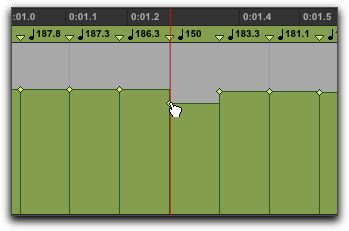
The Grabber tools let you create new tempo settings by dragging tempo events in the Tempo Editor.
Using a Grabber tool to change a tempo event
To change the tempo of a tempo event:

With the Grabber tool, drag a tempo event up or down.
To adjust the location of the tempo change:
With the Grabber tool, drag a tempo event to the left or right.
To remove a tempo event:
With the Grabber tool, Option-click (Mac) or Alt-click (Windows) the tempo event.