Curve Adjustment Mode
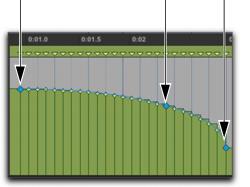
Immediately after you draw new tempos using the Pencil tool, a tempo curve appears in blue, outlining the newly created tempo graph. Blue adjustment handles on the curve let you adjust the shape and size of the new tempo graph.
Tempo Curve Adjustment handles

All the new tempo events under the curve will change as you move the Tempo Curve Adjustment Handles. To adjust the curve shape without the track data adjusting immediately, press Control (Mac) or Start (Windows) while adjusting the curve. Tempo events will change to fit the new curve when you release the mouse button.
The blue adjustment handles are only active until a new tool is selected or a new command is executed.