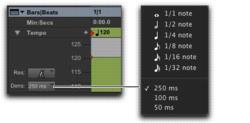
Selecting Tempo Edit Density
The Tempo Editor lets you specify the density of tempo events created in the Tempo ruler when you draw a tempo curve with the Pencil tool.
Tempo Edit Density selector and pop-up menu
To select the Tempo Edit Density for Pencil tool edits:

Click the Tempo Edit Density selector and select a time value from the pop-up menu. Tempo events created by drawing with the Pencil tool are placed in the Tempo ruler at the specified density.

Pressing Control (Mac) or Start (Windows) before drawing a pencil line conforms already created tempo events to the drawn line rather than creating new tempo events.