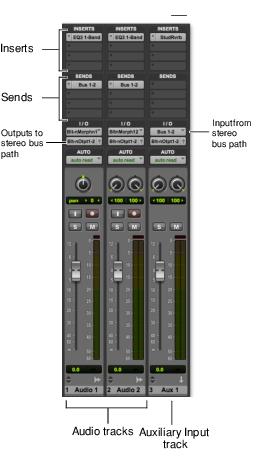
Signal Routing Pro Tools | First provides software-based mixing and signal routing controls for audio and MIDI. These controls are located in the Mix window. Some of these controls can also be accessed from the Edit window. A common audio signal routing task is to submix multiple tracks to a single channel strip (such as an Auxiliary Input) for shared processing and level control. The following example shows two audio tracks submixed to a stereo Auxiliary Input. Submixing to an Auxiliary Input Signal Routing Options Signal routing options include the following: Track Input and Output (I/O) Controls The most basic type of signal routing is track input and output. A track needs to have an assigned input path to record audio, and an assigned mapped output path in order to be audible through a hardware output. Signals can also be routed to or from other tracks in Pro Tools | First (or hardware inputs and outputs) using internal busses. Auxiliary Input and Master Fader Tracks Auxiliary Inputs can be used as returns, submixers, and bus masters. Master Fader tracks are used as bus and output master level controls. Both Auxiliary Input and Master Fader tracks can have plug-in inserts. MIDI Tracks MIDI tracks are generally used for routing MIDI from internal or external sources to external MIDI devices. MIDI data can also be routed to plug-ins on Auxiliary Inputs or Instrument tracks. Instrument Tracks Instrument tracks are the primary way to route MIDI to an instrument plug-in and then route plug-in sound to outputs, sends and busses, or other inserts. Instrument tracks can also be used to send MIDI to and monitor audio from external MIDI devices. Sends Sends route audio from tracks to hardware outputs, or to internal busses that are in turn routed to other tracks within your project. MIDI and Master Fader tracks do not have sends. Plug-in Inserts Plug-in processing occurs completely within your project. MIDI tracks do not have inserts. Instrument Plug-ins Instrument plug-ins are different from processing plug-ins in that they generate audio rather than process the audio signal from a track’s audio input or from hard disk. Instrument plug-ins are played by MIDI. Paths Paths are any routing option in Pro Tools | First, including internal or external inputs, outputs, busses, and inserts.